AI-first development has changed how I work more in the past year than almost anything else in my time as a software engineer. A couple of years ago, I wrote thousands of lines of code a year. Today, I don’t write code anymore. Features, one-line changes, and bug investigations all start with an agent.
It didn’t happen overnight. Initially, it handled autocomplete, snippets, and questions. Then it progressed from functions to complete features and nearly every implementation task. The improvements throughout 2026 have been remarkable. Even for simple changes, I’d rather describe the result and let an agent handle it.
Instead of writing code, I spend my time deciding what should be built, refining implementation plans, reviewing diffs, and making sure the result actually works. I’m still responsible for the decisions and the final product. I’m just no longer the one typing out the implementation.
The biggest difference with AI-first development, though, is speed. I can take an idea from a rough description to something working at a pace that simply wasn’t possible when I had to write and troubleshoot every part myself. And I’m not limited to one task at a time: multiple agents can investigate different problems or build features across entirely different projects while I move between planning, reviewing, and making decisions. It’s changed not just how I build things, but how much I can realistically take on.
This isn’t a prediction that nobody will write code by hand in 2027, and it certainly doesn’t mean software engineering knowledge is becoming irrelevant. Quite the opposite: understanding the system is what lets me spot a bad approach before it ships. The work has shifted from writing code to directing and reviewing the agents that write it.
From Writing Code to Orchestrating Agents
I used to think of development as something I did primarily inside an editor: understand a problem, find the files, write the change, test it, and fix whatever broke. AI initially helped with pieces of that process. Now I delegate most of the implementation itself.
My first message describes the outcome I want, not which function to edit. For a visual change, I might include a screenshot of the live page or the exact sentences I want added. Then the agent works out what needs to change.
I still make the product and engineering decisions, including whether the architecture makes sense and the result is acceptable. What I no longer do is spend my day translating those decisions into code. And because I’m not implementing every detail myself, I can move between ideas and projects much faster than before.
Of course, a vague request can also produce a lot of wrong code very quickly. That’s why planning is central to my AI-first development workflow: moving faster only helps if the agent is headed in the right direction.
My AI-First Development Workflow: Plan, Then Build
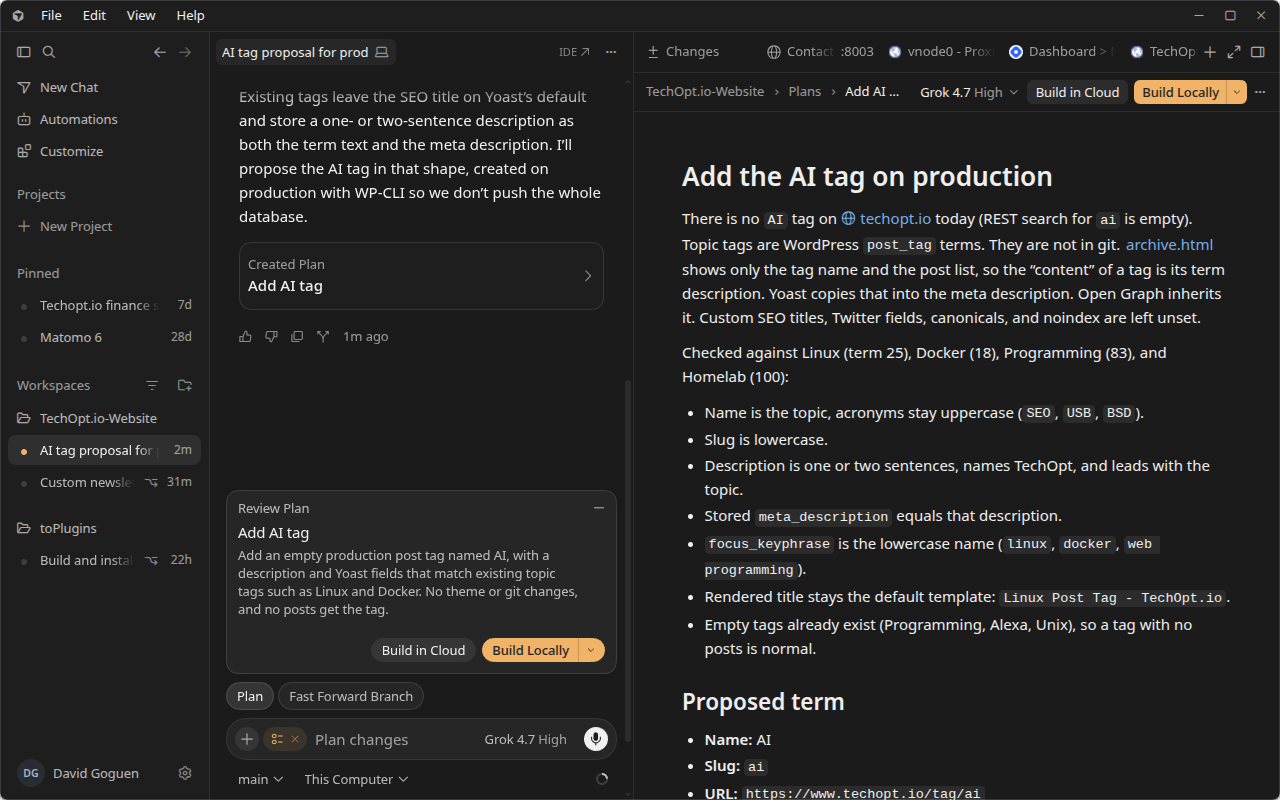
For anything beyond a straightforward tweak, I use Cursor’s Plan Mode. The first step is to describe the desired result, let the agent inspect the project, and review its implementation plan. I don’t ask it to build yet.
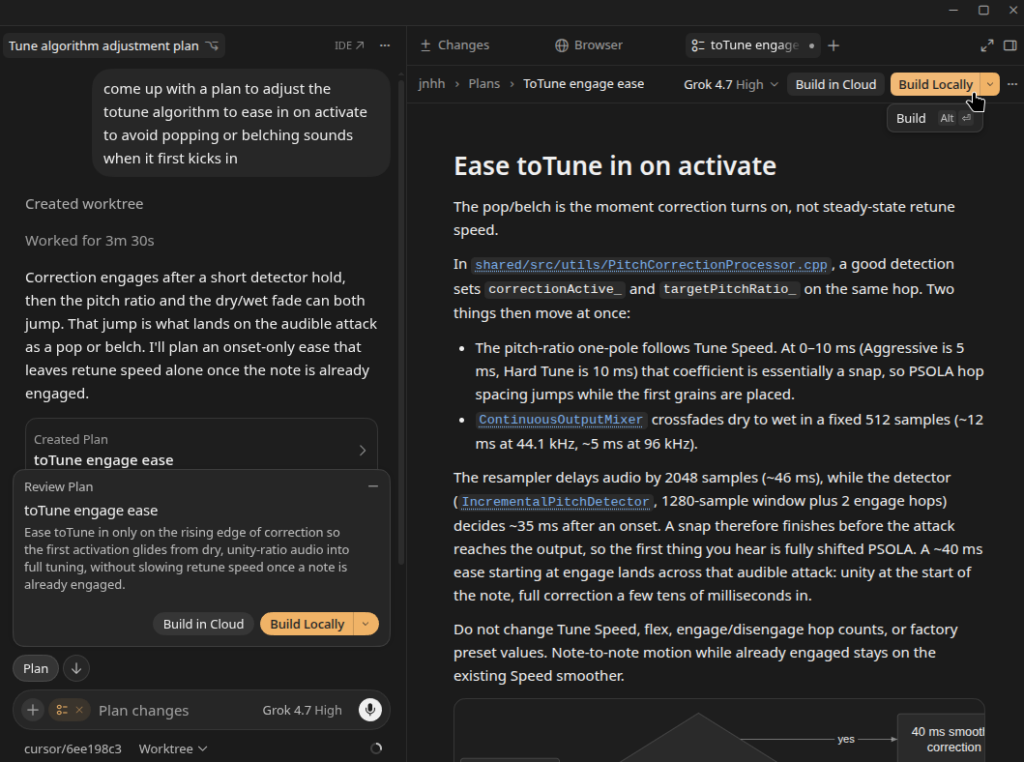
Usually I reply with a few short corrections. Maybe it misunderstood an existing component, proposed unnecessary work, or chose an approach I don’t want. Those replies refine the same plan instead of starting a new task. Once the plan matches the change I actually want, I tell the agent to implement it.
I’d much rather correct a paragraph in a plan than review hundreds of lines built around the wrong assumption. This saves on token usage and cost.
The saved plans are Markdown files with an overview, todos, and the approach. At implementation time, the agent follows the approved plan without making me retype it. I’ve accumulated nearly 2,000 saved plans. Those aren’t chats or shipped features, but they show how routine this has become.
Small changes skip the formal plan. They don’t skip the agent.
Breaking Big Features Into Issues and Pull Requests
For larger features or more complex projects, I don’t usually hand an agent one enormous implementation request and hope for the best. I start with a broader plan, break the work into smaller issues, and use Plan Mode to work through the approach for each one. Once a smaller issue has a plan I’m happy with, the agent can implement it and open a separate pull request.
That keeps each change focused and gives me something manageable to review and test. It also makes it easier to work on independent issues in parallel, rather than waiting for one huge feature branch to be finished before anything else can move forward. The overall direction still comes from me, but the implementation can happen in smaller, well-defined pieces.
Rules and Skills Handle the Repetitive Instructions
I also use persistent rules and reusable Markdown skills. General rules follow me across chats, while project-specific rules give agents the context for the repository they’re working in. I don’t repeat these procedures.
For my website, for example, the agent already knows that starting Docker containers isn’t enough if a WordPress change needs real posts, navigation, or media. It knows how to prepare a useful local environment. Other rules direct theme changes toward the appropriate block-theme configuration rather than piling on unnecessary CSS. A shipping skill defines the release procedure.
My daily client is Cursor, but the workflow matters much more than the editor. I could follow the same approach with Claude Code, Codex, or whatever comes next.
Multiple Agents Make AI-First Development Faster
The biggest productivity gain isn’t just that one agent can finish a task faster than I could. It’s that several agents can make progress at the same time. I can have one investigating a bug, another implementing a planned feature, and another working on a completely different project. I can move between them to answer questions, review changes, and approve the next steps instead of personally writing each implementation in sequence.
This works particularly well when I’ve broken bigger projects into smaller issues and pull requests. Independent tasks don’t have to wait on each other, and each agent has a specific piece of work to focus on. I still have to watch for overlapping changes, make sure the pieces fit together, and review what they produce. But the overall pace is something I couldn’t have achieved when every change depended on my own keyboard time.
Git Worktrees and Multiple Development Servers
One thing I’ve come to rely heavily on is Git worktrees. They let me have multiple branches of the same project checked out in separate directories. This allows different agents to work on different features simultaneously without constantly stepping on each other’s changes.
I also run multiple development server instances on different ports. This means each agent can build and test its changes independently. For web projects, this means I can have several versions of the same application running locally at once, with each agent using the browser to test its own implementation.
Combined with breaking larger features into smaller issues and pull requests, this has become a huge productivity boost. Instead of finishing one feature before starting another, I can have several agents actively implementing and testing separate changes while I move between reviewing plans, answering questions, and approving their work.
It’s another example of how AI-first development has allowed me to work at speeds I simply couldn’t have managed on my own.
Cloud Agents
Cloud agents take this a step further. Instead of running everything locally, agents can work independently in their own remote development environments, even when my computer is turned off. They can implement features, run tests, and prepare pull requests for review without tying up my local machine. I still like having separate worktrees and development servers locally, but cloud agents open up even more possibilities for running several tasks in parallel.
Cloud agents are something I’ve only started experimenting with more recently. I expect they’ll become increasingly popular in 2027 as more AI-based workflows are offloaded to the cloud.
Even Debugging Starts With an Agent
AI-first development isn’t limited to new features. When something breaks or feels slow, my first move is often to ask an agent to investigate why. I want it to inspect the relevant code, trace the behavior, and work out how to reproduce the problem before it starts changing things.
“Why is this slow?” is a request for an explanation, not permission to rewrite the implementation. Likewise, “Should we fix it?” should produce a recommendation, not an unexpected code change.
If the investigation identifies a sensible fix, I can authorize the change or ask for a plan, depending on its complexity. For particularly difficult bugs, I might have a more capable model perform the investigation and let a cheaper one implement the approved fix. AI-first development is as much about knowing when not to build as it is about generating code.
The Agent Has to Test Real Apps
For web work, I don’t consider a change done just because it compiles. My rules tell the agent to open the page and actually use it with Cursor’s built-in browser, which the agent can control through MCP tools.
That means clicking buttons, typing into inputs, submitting forms, and visiting other screens affected by the same state. Empty and error states matter, too. For layout changes, I expect checks at desktop and phone widths.
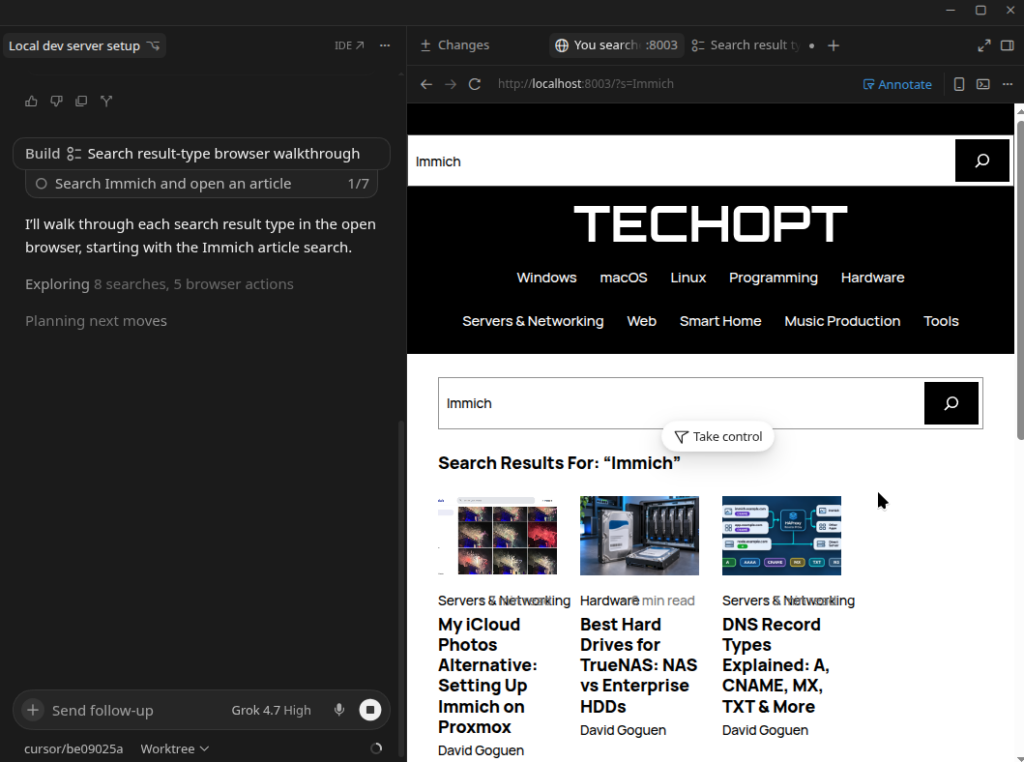
I can also sign into a site myself in that browser and then let the agent continue in the authenticated session. A screenshot is useful evidence of how a page looks, but it isn’t a substitute for interacting with it. If testing fails, the agent fixes the problem and tests again. Afterward, I review the diff.
For mobile apps, I use mobile-mcp, which lets the agent interact with iOS simulators, Android emulators, and even my physical phone! It can navigate screens, tap controls, and enter text in the running app. The principle is the same as on the web: test what a user actually experiences instead of assuming that a successful build means the change works.
MCP Extends AI-First Development Beyond the Editor
The Model Context Protocol (MCP) has made agents much more useful to me. Their work no longer has to stop at the files in a repository. They can interact with services involved in a task rather than asking me to copy information from multiple dashboards.
For example, I use official MCP plugins for Stripe and Firebase when working on features involving those platforms. Stripe’s MCP integration lets the agent interact with the relevant service tools. Firebase provides project-aware capabilities. Connecting them doesn’t mean I automatically authorize every action; it means the tools are available when the task calls for them.
My WordPress connection is more personal. I use an MCP adapter for my own site, so the agent can discover supported abilities, inspect their schemas, and invoke them. I don’t have to paste its state into the conversation.
AI-First Development for Self-Hosted Apps
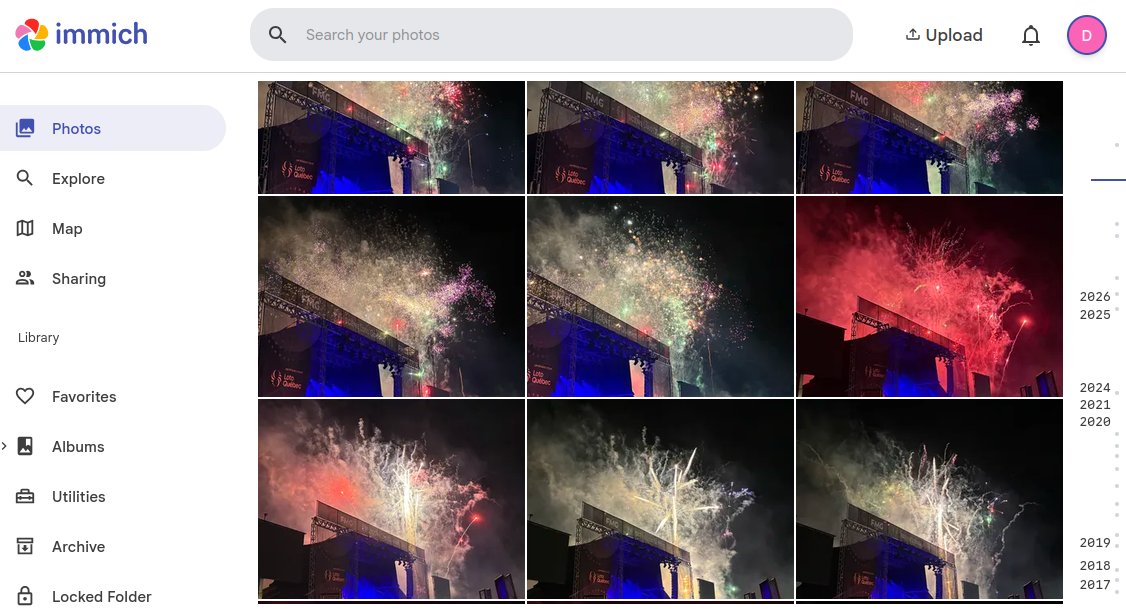
Then there’s my homelab. I’ve given Cursor SSH access to my Proxmox servers, along with access through the browser MCP, so the agent can actually work with my infrastructure rather than just tell me what commands to run. I’ve written about projects like my Immich photo backup setup, but lately I’ve been using Cursor to spin up a whole collection of new self-hosted apps, including Paperless-ngx and Warracker, in new LXC containers.
AI-first development applies to infrastructure for me, too. Even when I’m spinning up a self-hosted app, I start with Plan Mode. I ask the agent to work out the deployment approach for a new LXC container, review the steps, and correct anything I don’t like before it starts changing my infrastructure. Once we’ve agreed on the plan, I let it handle much of the container setup, installation, and configuration over SSH and in the browser. I still review what it’s doing, but it’s made experimenting with self-hosted apps and expanding my homelab faster and easier than ever. Spinning up a new service feels much less like a project in itself.
Home Assistant and AWS Management
I even use Cursor to come up with and implement new things in Home Assistant. An agent can brainstorm useful automations or improvements for my smart-home setup, then help me figure out how to put the best ideas together. I’ve written about practical automations like low-battery notifications in Home Assistant before, but now AI makes it much easier to go from wondering what else I could automate to actually implementing it.
It’s not just my homelab, either. I also use Cursor’s browser MCP to help manage the AWS infrastructure behind this blog. Having an agent work through the AWS console alongside me makes infrastructure management part of the same workflow, without needing to handle every step in the browser myself.
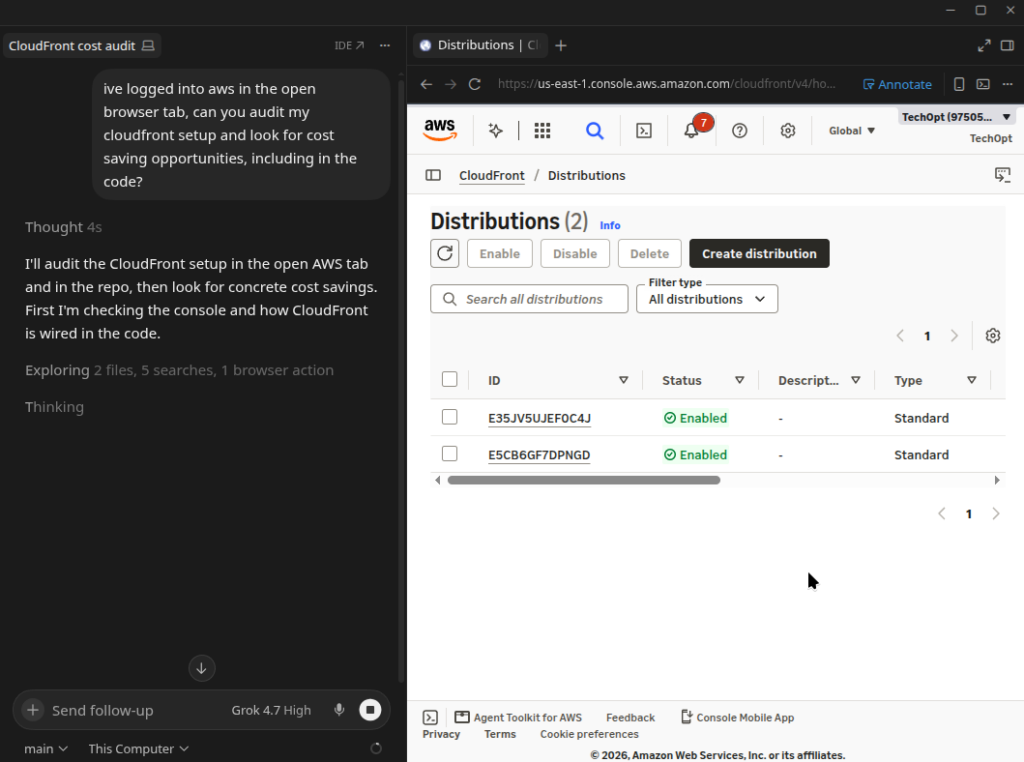
The interesting part of AI-first development isn’t how many integrations I have. It’s that I can describe an outcome and let an agent work across the code, connected services, and infrastructure needed to accomplish it, while I keep control over the decisions.
AI-First Development Is Getting More Expensive
There’s one frustrating catch to all this progress: agentic development has become increasingly expensive to use heavily.
I used to have genuinely unlimited Cursor usage. That went away, and Auto pricing became more complicated, too. I’m still on Cursor’s legacy $200 USD/month Ultra plan, which includes separate monthly allowances for Cursor models and third-party models like Claude Opus.
That distinction matters because the newer X Subscription Ultra is not the same plan, despite having the same $200 USD/month price tag. It includes a weekly pool of Cursor and Grok model usage, but no included third-party model allowance. You can still use models like Claude Opus, but they’re billed separately at API list prices from the first request. Cursor lays out the differences in its legacy plan comparison.
I’ve even exhausted the included usage on my legacy Ultra plan a few times. That’s a little under $300 CAD per month, so running out of included usage at that price really puts the rising cost of AI-first development into perspective. The newer plans may offer more Grok usage, but losing the included third-party allowance is a significant tradeoff for someone who switches between models.
I don’t want this to become a pricing guide, especially when the numbers and plans keep changing. But cost now influences how I work, and I expect it to remain part of the conversation in 2027.
Keeping AI-First Development Affordable
My approach is straightforward: use an inexpensive model when it’s good enough, and pay for stronger reasoning when it’s actually needed. I estimate that Grok handles more than 90% of my tasks. Composer used to be my daily default, but over 2026 I’ve found Grok capable enough and better for most implementations.
For complicated features and particularly tricky bugs, I switch to Claude Opus. Sometimes I use Opus to work through a difficult plan, approve the approach, and hand implementation to Grok. I don’t necessarily need the expensive model for every step just because it was valuable for the first one.
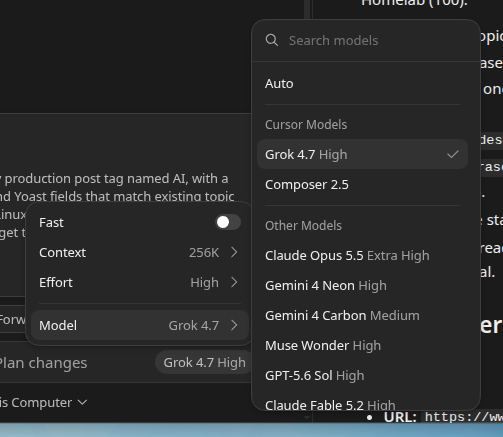
There’s also an important distinction in my Grok settings: Fast is off, and reasoning effort is High. Fast is a speed tier with a higher price, not a way to reduce thinking. Lowering effort to Medium or Low can reduce reasoning-token consumption, but I generally prefer High for its balance of results and cost. I save money by leaving the faster speed tier off rather than assuming faster execution is free.
Of course, the cheapest individual request isn’t always the cheapest path to a working result. Several failed attempts can cost more than one request to a better model. I’m optimizing for a correct outcome, not just a low price per token.
Code Review Is the New Coding
With agents doing so much implementation, I spend more time reading plans and diffs than writing functions. Splitting a larger feature into individual issues and pull requests helps here: I can review one contained change at a time instead of deciphering a massive diff. I look for unintended changes, unnecessary complexity, missed edge cases, and solutions that technically work but don’t match the original requirement.
Even Code Reviews Are Becoming Agent-Driven
Ironically, agents are increasingly handling code reviews themselves, too. I can have one agent implement a feature, then ask another to review the changes for bugs, edge cases, unnecessary complexity, or anything that doesn’t follow the original plan. The implementing agent can address that feedback, and the process repeats until the reviewers are satisfied.
These iterative review loops catch issues before I even look at the final diff. Of course, I still review the important changes myself and make the final decisions, but having agents review each other’s work adds another layer of quality control without slowing development to a crawl. It’s yet another way AI-first development lets me move faster without completely sacrificing code quality.
Human Oversight Still Matters
My agents do have boundaries. A question isn’t permission to build. A request to fix something isn’t permission to commit or publish it, unless I tell it to do so. For my website, shipping is a separate instruction governed by a skill: use the expected branch and pull-request flow, check what else would ship, and verify deployment rather than assuming a push means success.
That’s why I don’t believe AI-first development makes engineering knowledge obsolete. It makes judgment more important. When code can be produced this quickly, recognizing the wrong approach matters at least as much as knowing how to implement the right one.
What About Developers Who Are Just Starting Out?
I’ve been programming for more than 15 years. I learned how to build and debug software long before I could ask an agent to do it for me. That experience is a huge part of why this workflow works: when an agent proposes an architecture, changes a query, or hands me a diff, I usually have enough context to judge whether it makes sense.
I sometimes wonder what AI-first development means for someone learning programming in school today. If an agent can write the assignment, how do you develop the instinct to spot a bad implementation, question an assumption, or debug something when the agent gets stuck? It’s one thing to review code you understand. It’s another to approve code because it looks plausible.
At the same time, I can see AI being an incredible learning tool. You can ask it to explain unfamiliar code, compare approaches, and walk through why something failed. Maybe students will learn differently, rather than less. I don’t have a definitive answer, but I think learning to evaluate what an agent writes will be just as important as learning to prompt one.
AI-First Development in 2027: What’s Next?
The pace of model improvement throughout 2026 has been genuinely impressive. Tasks that once required a premium model increasingly work with something more economical. More than anything, I’m excited by the speed at which I can now turn an idea into working software, and by how many separate projects I can move forward at once with multiple agents. I don’t expect my current model choices, or even my current editor, to be permanent.
I’m not arguing that everyone should stop writing code by hand. This is simply where my own day-to-day workflow has ended up. Going into 2027, I’m more excited about software development than I have been in a long time.
The tools will change. The models will improve. What won’t change is my role: defining what needs to happen, correcting plans, reviewing the result, and deciding what ships; or will AI start doing these, too? We’re certainly headed in that direction and seeing it already!
I’m writing less code than ever. I’m working at speeds I never would have imagined were possible a few years ago. Meanwhile, I don’t feel like I’m doing any less engineering.

Leave a Reply