If you’re ready to upgrade openSUSE Leap 16.0 to 16.1, the process is straightforward using the official openSUSE Migration Tool. Released on November 3, 2026, Leap 16.1 is the next minor release in the Leap 16 series, and you can upgrade in place without reinstalling your system.
TL;DR: Install opensuse-migration-tool, preview the changes using --dry-run, run the migration, and reboot. Back up your system first, particularly if you’re upgrading a server.
This guide assumes you’re already running Leap 16.0. If you’re still on 15.6, follow my guide to upgrading Leap 15.6 to 16.0 first.
Before Upgrading openSUSE Leap
Start by confirming your current version:
cat /etc/os-releaseYou should see VERSION_ID="16.0" in the output. Next, refresh your package information and install available updates:
sudo zypper refresh
sudo zypper update
Before proceeding, I recommend a few precautions:
- Make a backup: Back up important files and configuration. If you’re running Leap in a virtual machine, take a VM snapshot or backup that you know you can restore.
- Check available disk space: Run
df -hand ensure there’s enough room for downloaded packages and the upgrade. - Plan for downtime: The upgrade replaces system packages and requires a reboot. If you’re connected over SSH, use a persistent terminal session or have console access available.
- Review additional repositories: Run
sudo zypper lr -uand note any third-party repositories, such as Packman, before starting.
It’s also worth checking the official Leap 16.1 release notes for changes that might affect your setup.
Upgrade openSUSE Leap 16.0 to 16.1
Step 1: Install the openSUSE Migration Tool
First, install the official migration utility:
sudo zypper install opensuse-migration-toolThe openSUSE Migration Tool manages the repository transition and package upgrade for you. It’s also the method recommended in the Leap 16.1 release notes.
Step 2: Preview the Upgrade
Before making changes, perform a dry run:
sudo opensuse-migration-tool --dry-runSelect openSUSE Leap 16.1 if prompted. The tool will show the migration operations it would perform without applying the package changes. Review any warnings, particularly those involving repositories or packages that might be removed.
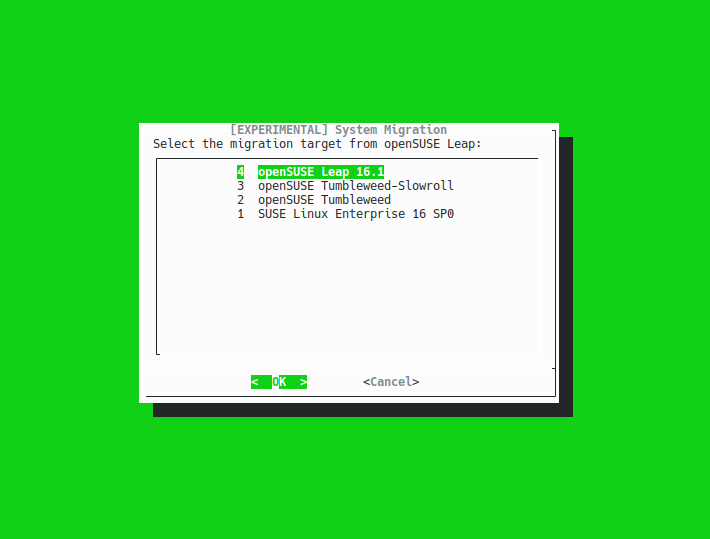
Don’t continue with the real upgrade until you’ve understood any unexpected changes. A dry run isn’t a substitute for a backup, but it’s a useful way to catch problems early.
Step 3: Run the Migration
Once you’re satisfied with the preview, start the actual upgrade:
sudo opensuse-migration-toolSelect openSUSE Leap 16.1 as the destination. The tool may also ask whether to disable unrecognized third-party repositories. In most cases, disabling these temporarily is the safer option, since their existing URLs or packages might not support Leap 16.1.
Confirm the changes, then let the migration download and install the required packages. Avoid interrupting the process.
Unlike the older method in my Leap 15.5 to 15.6 upgrade guide, there’s no need to manually change the release version in your repositories or run zypper dup yourself. The migration tool handles those steps.
Step 4: Reboot and Verify Leap 16.1
After the tool finishes successfully, reboot your system:
sudo rebootOnce it’s back online, check the installed release:
cat /etc/os-releaseYou should now see VERSION_ID="16.1". You can also check for repository issues with:
sudo zypper refresh
sudo zypper lr -u
Finally, verify your important applications and services are working as expected.
Troubleshooting the Leap 16.1 Upgrade
If you run into problems, start with these checks:
- Leap 16.1 isn’t listed: Refresh your installed packages, confirm you’re on Leap 16.0, and make sure
opensuse-migration-toolis current. - Third-party repository errors: Disable incompatible repositories for the migration. Only re-enable them afterward when they explicitly support Leap 16.1.
- Dependency conflicts or unexpected removals: Review the package proposals instead of blindly accepting them. Check for packages installed from third-party sources.
- Service or application issues after reboot: Check the relevant logs with
journalctl -b -p warningand confirm any third-party packages are compatible with 16.1.
If the migration fails partway through, don’t reboot blindly or try random repository changes. Examine the error and use your backup or snapshot if recovery becomes necessary.
Final Thoughts
It’s now relatively easy to upgrade openSUSE Leap 16.0 to 16.1 using the official Migration Tool. The most important steps are backing up first, reviewing the dry run, and checking your repositories after the reboot. That should make the transition simpler whether you’re using openSUSE on a desktop or server.


Leave a Reply