DNS record types explained simply: A records connect hostnames to IP addresses, CNAME records create aliases, and MX records handle email delivery. Understanding these differences makes managing websites and homelab services much easier.
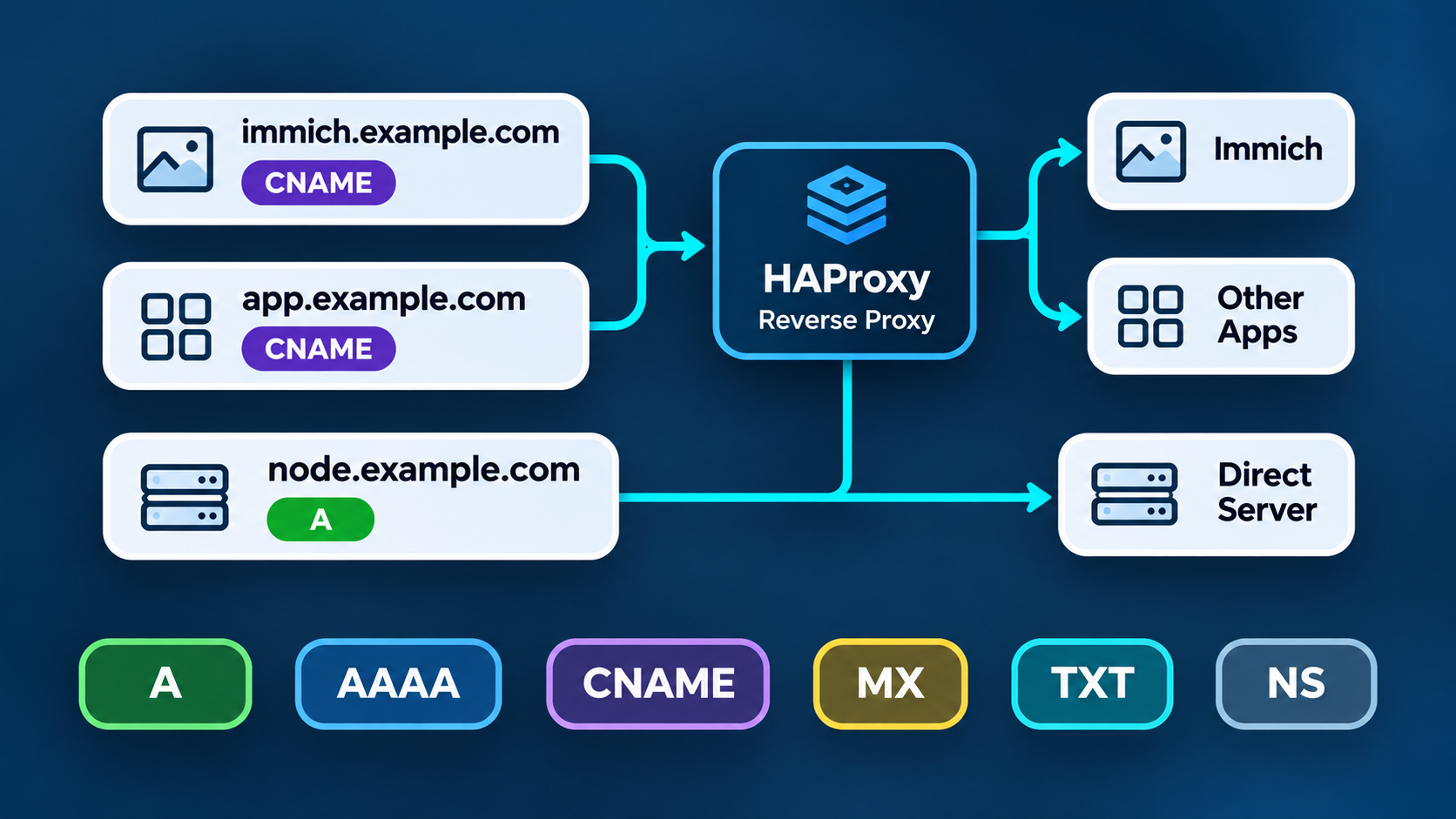
For example, in my homelab, I use A records to point directly to individual machines. Meanwhile, CNAME records give services friendly names that resolve through my HAProxy reverse proxy. Here’s how the most common types work.
Common DNS Record Types Explained
| Record | What it does | Example use |
|---|---|---|
| A | Points a hostname to an IPv4 address | server.example.com → 192.168.1.25 |
| AAAA | Points a hostname to an IPv6 address | Giving an IPv6-enabled server a name |
| CNAME | Makes one hostname an alias of another hostname | app.example.com → proxy.example.com |
| MX | Identifies mail servers that receive email for a domain | Delivering email to a mail provider |
| TXT | Stores text used for verification and policies | Domain verification, SPF, DKIM, DMARC |
| NS | Identifies authoritative nameservers or delegates a DNS zone | Delegating DNS management |
| CAA | Restricts which certificate authorities may issue certificates | Limiting TLS certificate issuance |
| SRV | Advertises a service’s hostname and port | Service discovery for supported applications |
| PTR | Maps an IP address back to a hostname | Reverse DNS lookups |
Generally, A, AAAA, CNAME, MX, and TXT are the records you’ll encounter most often. However, the others are equally useful in specific situations, especially when managing servers or more complex networks.
For a complete reference, see Cloudflare’s DNS record documentation.
How I Use A and CNAME DNS Records in My Homelab
I host several services on Proxmox, including Immich in a Debian LXC container. Rather than point every application’s hostname directly to its server, I use HAProxy on my firewall as a common entry point for web applications.
This way, I can manage routing centrally without updating the DNS records for every application when I make changes behind the proxy.
Here’s a simplified example using fictional hostnames and private LAN addresses configured in local DNS:
| Type | Hostname | Points to |
|---|---|---|
| A | proxy.example.com | 192.168.1.10 (HAProxy) |
| CNAME | immich.example.com | proxy.example.com |
| CNAME | app.example.com | proxy.example.com |
| A | node.example.com | 192.168.1.25 (direct server) |
For example, when I open immich.example.com, DNS first follows its CNAME to proxy.example.com. Next, it resolves the proxy’s A record to obtain its IP address.
The browser then connects to HAProxy, which uses the requested hostname to forward the HTTPS request to the correct backend service. Additionally, HAProxy can handle TLS certificates centrally.
In other words, the CNAME provides the alias, while HAProxy handles the actual routing. See HAProxy’s frontend documentation for more details.
In contrast, when I want to access a machine directly, I use an A record such as node.example.com. This resolves straight to the machine’s IP address, completely bypassing HAProxy. Furthermore, keeping these management records in local DNS prevents me from unnecessarily publishing private services.
If you’re setting up a server from scratch, my guide to static IP addresses and DNS on Ubuntu Server covers the other side of that configuration.
DNS Record Limitations: What CNAME Cannot Do
Although I think of CNAME records as a convenient “mask” for my proxy hostname, they do not hide IP addresses or proxy network traffic.
Instead, they simply point one hostname to another. As a result, anyone who can query those DNS records can follow the alias to the proxy’s address. HAProxy is what actually forwards requests to individual services.
There are also a few important limitations to remember:
- CNAME records cannot point directly to IP addresses. Instead, they must reference another hostname.
- A standard CNAME cannot coexist with other records at the same name. Therefore, ordinary CNAME records cannot be used at a DNS zone’s root, which requires other records.
- DNS does not specify web application ports. Instead, HAProxy handles forwarding requests to backend ports such as
8080. - DNS changes are not always immediate. This is because the record’s TTL controls how long DNS answers may be cached.
Which DNS Record Type Should You Use?
To recap the DNS record types explained here, use an A record for a direct IPv4 address, AAAA for IPv6, and CNAME when you want one hostname to follow another. Meanwhile, MX and TXT handle much of the email-related configuration, while other DNS records support delegation, security, and service discovery.
For my homelab, combining A records with CNAME aliases keeps DNS organized. More importantly, it lets me change my HAProxy endpoint without having to edit every application’s DNS record.




Leave a Reply